The Biofire Smart Gun is a complete system that includes the Smart Gun, the Dock, and supporting components for setup, charging, and user management.
Included Components
The Smart Gun system comes with the following components:
- Product Manual
- The Smart Gun
- The Dock
- Data Cable (USB Type-C)
- Power Cable (USB Type-C)
- AC Adapter
- Magazines (2x)
- Backstraps (2x)
- Takedown Tool
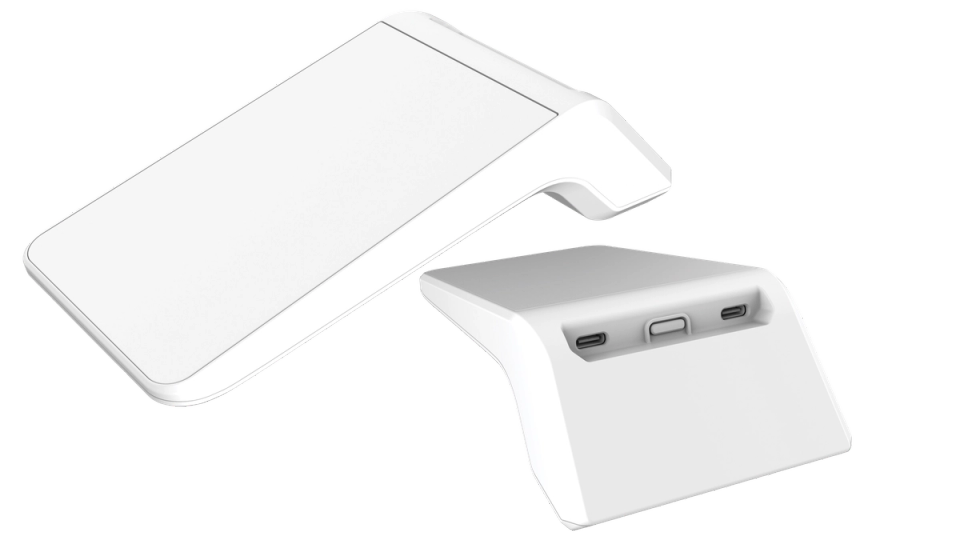
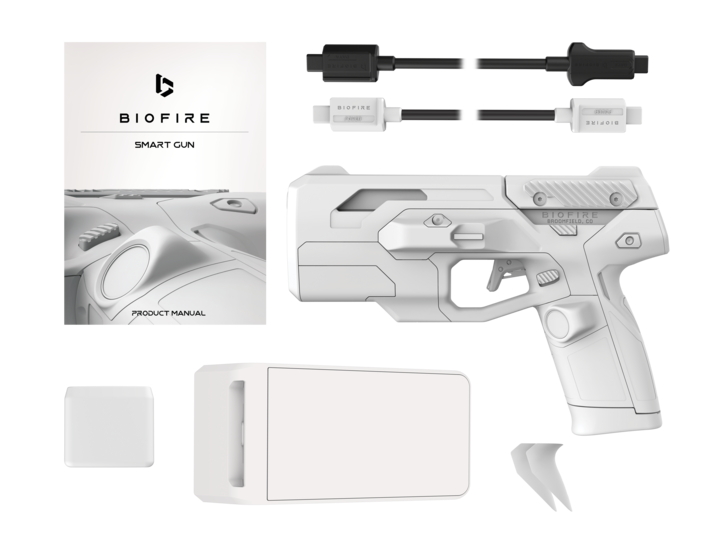
Please refer to page 13 of your Product Manual for more information on system components.
Initial Setup

Handle your Smart Gun safely and responsibly at all times. Failure to follow proper firearm safety practices can lead to injury, death, and/or damage.
- Keep the muzzle of your Smart Gun pointed in a safe direction at all times.
- Keep your finger off the trigger of your Smart Gun until ready to fire.
- Only point the Smart Gun at intended targets, and always know your target and what lies beyond your target.
- Always treat your Smart Gun as if it is loaded, even after clearing it.
- Make sure your Smart Gun is unloaded and clear before any cleaning or service and always wear eye protection when cleaning or servicing your Smart Gun.
- Always read and follow the Product Manual.
Follow these steps to set up the Smart Gun system:
- Connect the AC Adapter to a wall outlet
- Attach the Power Cable between the AC Adapter and the Dock's Power USB-C Port
- Connect the Data Cable from the Dock's Data USB-C Port to the Smart Gun's USB-C Port
Please refer to the Biofire Dock Onboarding article for detailed setup instructions.
The Dock
Charging
Biofire recommends keeping the Smart Gun connected to the Dock, and the Dock connected to wall power, so that the battery remains fully charged for operation when it is needed. Disconnect the Smart Gun from the Dock and power off the Dock to preserve the Dock's battery charge when away from wall power.
Control Center
The Dock is the Smart Gun's interface for enrolling as the owner, adding secondary user profiles, changing settings, and updating software. The Dock communicates with the Smart Gun over a USB Type-C cable.
The Dock can:
- Enroll the owner and add secondary users
- Charge the Smart Gun
- Customize Smart Gun settings
- Update software
Please refer to the Dock Onboarding article for step-by-step instructions for physical setup.
The Smart Gun
- Arms when the system recognizes either a fingerprint or face of an authorized user
- Both biometric systems operate in the dark and across a wide variety of lighting conditions
- All biometric data is encrypted and stored exclusively and locally on the firearm
- Returns to a disarmed state when the Smart Gun no longer detects user presence
Electronic Fire Control
- The Smart Gun uses a fully integrated electronic fire-control system, which prevents the firearm from firing unless an authorized user is authenticated and pulls the trigger
- The fire-control system remains disarmed where there is no authorized user, preventing the Smart Gun from firing
- The electronic system enables safe and consistent operation when the firearm is armed
Data Security
The Smart Gun stores biometric data in fully encrypted form locally on the device. The Dock does not store or have access to any biometric data.
The Dock can optionally connect to Wi-Fi to receive software updates, but the Smart Gun will function with factory settings even if a software update is never installed.
If you choose not to connect to Wi-Fi, you are responsible for checking your Biofire account, email and Biofire website for required updates.
The Dock is the only part of the Smart Gun system that can connect to the internet, and that connection is optional. Biofire recommends connecting to Wi-Fi to receive and download new software releases as they become available.
Any Biofire Dock can be used with any Biofire Smart Gun.