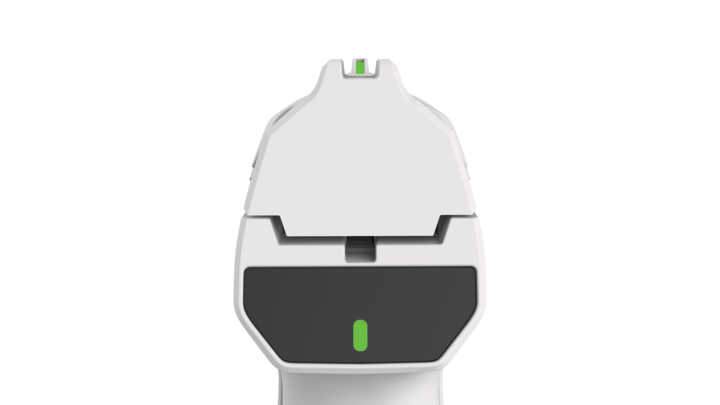
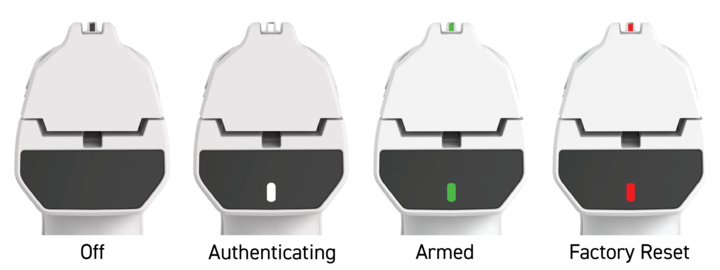
The Biofire Smart Gun uses status indicators on the front sight and rear display to communicate operational state such as whether the Smart Gun is armed, disarmed, or authenticating. These indicators provide real-time visual feedback about the Smart Gun's current operational state.
Please refer to pages 34-37 of your Product Manual for more information on status indicators, warning states, and the rear display.

Handle your Smart Gun safely and responsibly at all times. Failure to follow proper firearm safety practices can lead to injury, death, and/or damage.
- Keep the muzzle of your Smart Gun pointed in a safe direction at all times.
- Keep your finger off the trigger of your Smart Gun until ready to fire.
- Only point the Smart Gun at intended targets, and always know your target and what lies beyond your target.
- Always treat your Smart Gun as if it is loaded, even after clearing it.
- Make sure your Smart Gun is unloaded and clear before any cleaning or service and always wear eye protection when cleaning or servicing your Smart Gun.
- Always read and follow the Product Manual.
The Guardian Biometric Engine
The Guardian Biometric Engine powers the arming and disarming of the Smart Gun by sensing when it has been picked up or put down by a user, and verifying valid biometric data of an authorized user. The Guardian Biometric Engine includes:
- Presence sensors that actively detect when someone is gripping the Smart Gun
- Fingerprint identification and facial recognition systems that independently verify and authenticate an authorized user
- Electronic fire control system
The Smart Gun becomes armed only after the Guardian Biometric Engine is provided with biometrics of an authorized user.
Please refer to The Smart Gun Biometrics article for more information on the Guardian Biometric Engine.
Status Indicator Overview
Status indicators are located on both the front sight and the center of the rear display. The status indicator shows whether the Smart Gun is armed.
Status States
Integrated sensors on the front and rear of the grip automatically detect presence when the Smart Gun is picked up.
Off - No Light
- No user presence detected
- System is off and disarmed
White Light - Authenticating
- Smart Gun is disarmed
- Smart Gun is searching for authentication via fingerprint or facial recognition
Green Light - Armed
- The Smart Gun has authenticated the user
- The Smart Gun is ready to fire
Solid Red Light - Factory Reset
- The Smart Gun has no enrolled users
- Anyone can enroll as the owner
Release the grip to automatically disarm the Smart Gun.
Troubleshooting
If the Smart Gun stays in white (authenticating) state:
- Ensure your finger is properly positioned on the fingerprint sensor
- Ensure your face is visible to the facial recognition system
- Check that you are an enrolled user